
Analytics & Measurement
Adobe Analytics API 1.4 Is Retired: How to Find and Migrate Legacy Integrations
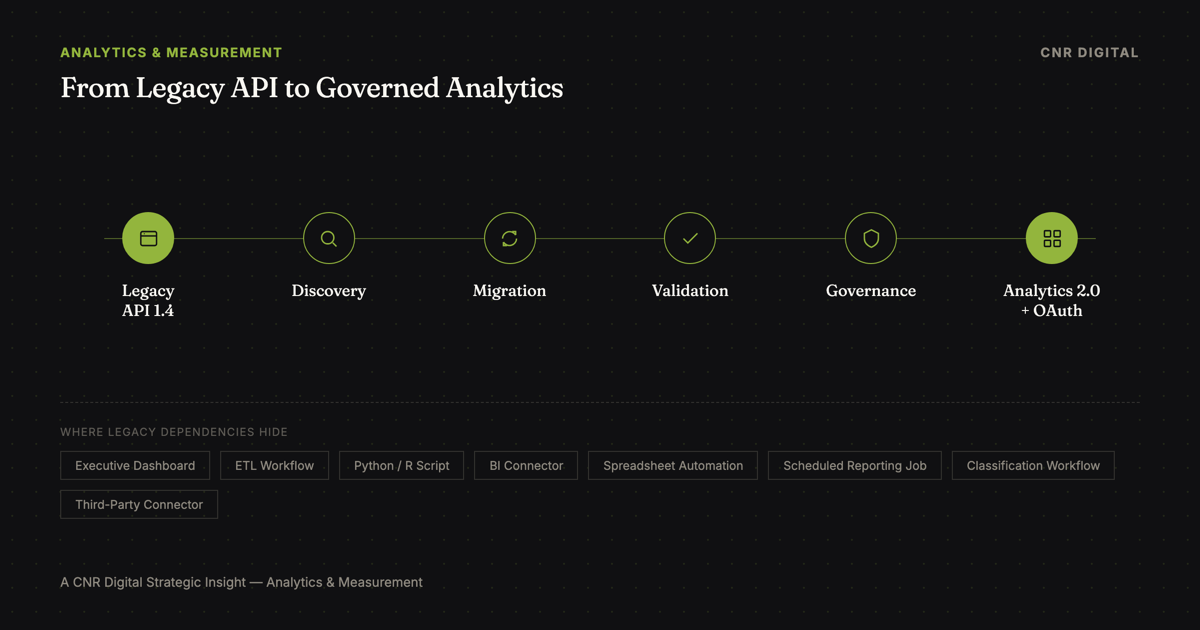
Adobe Analytics API 1.4 reached end of life on August 12, 2026, along with legacy WSSE authentication.
Adobe says integrations still using those services needed to migrate or they stopped working once the deadline passed.
The main migration path is to Adobe Analytics API 2.0 and OAuth-based authentication through Adobe Developer Console.
For analytics leaders, however, the real risk is not simply an old API endpoint.
It is an undocumented dependency.
A legacy API can sit behind:
- executive dashboards
- scheduled reporting jobs
- data extracts
- ETL workflows
- classification uploads
- internal admin utilities
- third-party connectors
- Python or R scripts
- spreadsheet automation
- report-suite governance tooling
When that dependency fails, the business problem may show up later as:
What an Undocumented Dependency Can Cost
That is why the migration should be treated as a measurement-governance exercise, not merely a credential update.
What Exactly Did Adobe Retire?
Adobe's developer documentation confirms the following reached end of life on August 12, 2026:
- Adobe Analytics API 1.4
- Adobe Analytics WSSE Authentication
The exception is the 1.4 Data Insertion API, which Adobe currently says is not affected by this retirement.
Adobe's migration guidance points 1.4 users toward Analytics 2.0 APIs, while WSSE users need to move toward OAuth-based authentication through Adobe Developer Console.
Is Adobe Analytics API 1.4 still supported? No. Adobe Analytics API 1.4 and WSSE authentication reached their end-of-life date on August 12, 2026, per Adobe's official documentation. Any integration still dependent on API 1.4 or WSSE should now be treated as urgent remediation work, not a future deadline to plan around.
Did an Adobe Analytics Integration Stop Working After August 12?
If a reporting job, dashboard feed, script or connector stopped working around that date, the API 1.4 or WSSE retirement may be the cause.
Before assuming the broader Adobe Analytics implementation itself is broken, the organization should first determine whether the specific failing workflow still references a legacy API 1.4 endpoint or WSSE credentials.
That distinction matters. A failure caused by the retirement is a known, solvable migration issue: the sections below explain how to confirm it and fix it. A failure unrelated to the retirement is a separate technical problem that migrating to Analytics 2.0 alone will not resolve.
First: Determine Whether Your Organization Actually Uses API 1.4
Do not assume your Adobe environment is unaffected simply because your current tagging uses Adobe Web SDK, Adobe Tags or a modern client-side implementation.
The API retirement is about legacy integrations, not ordinary Analytics data collection through modern tagging implementations.
Adobe provides a useful technical clue.
Legacy 1.4 integrations use API base URLs such as:
https://api.omniture.com
https://api3.omniture.com
https://api4.omniture.com
https://api5.omniture.com
Analytics 2.0 uses:
https://analytics.adobe.io
That gives teams an immediate first audit step:
Search code repositories, scripts, integration configuration and scheduled workflows for api*.omniture.com.
But do not stop there.
Where Legacy Adobe Dependencies Tend to Hide
A mature Adobe implementation often has more integration surface area than the analytics team remembers.
Custom Scripts
Search: Python, R, JavaScript, Java, PowerShell, shell scripts, notebooks, serverless functions.
Look for:
api.omniture.comapi3.omniture.comapi4.omniture.comapi5.omniture.com/admin/1.4/rest/- WSSE credentials
- legacy Adobe usernames or shared secrets
- old API method names
ETL and Data Engineering Workflows
Check scheduled extraction jobs, data-lake ingestion, warehouse pipelines, BI staging processes, cloud functions, orchestration tools, and Airflow or similar schedulers.
The analytics team may not own these systems anymore.
That is precisely why a cross-functional inventory matters.
BI Connectors
A dashboard can look healthy while the integration behind it is nearing failure.
Audit: Power BI, Tableau, Domo, custom BI connectors, agency-built reporting layers, legacy data marts, vendor-provided Adobe connectors.
The question is not merely:
"Does this dashboard use Adobe Analytics?"
Ask:
"How does the data get from Adobe Analytics into this dashboard?"
Spreadsheet Automation
Do not overlook Excel and similar workflows.
Legacy reporting automation frequently survives much longer than anyone expects.
A spreadsheet that refreshes every Monday morning can still be business critical even when nobody remembers how it was originally configured.
If your organization still uses Adobe's legacy Report Builder Excel add-in specifically, note that it has its own separate retirement timeline tied to the API 1.4 transition. Verify your migration deadline directly in Adobe's legacy Report Builder FAQ rather than assuming it matches the August 12 API 1.4 retirement date.
Third-Party Applications
A third-party application may use credentials or API calls your internal team does not control.
That creates additional risk.
The application may still be business critical even though the migration work belongs to the vendor.
Document: vendor, product, credential ownership, current API version, migration status, support contact, replacement plan.
Do not assume your vendor has already migrated.
Ask.
Build a Dependency Inventory Before You Migrate
Do not migrate one script at a time without creating an inventory.
For every suspected integration, document:
| Field | What to Capture |
|---|---|
| Integration | Name and purpose |
| Business owner | Who depends on the output |
| Technical owner | Who maintains it |
| API version | 1.4 / 2.0 / unknown |
| Authentication | WSSE / OAuth / other |
| Endpoint | Current base URL or method |
| Frequency | Real-time / hourly / daily / weekly |
| Output | Dashboard / file / warehouse / alert |
| Criticality | Low / Medium / High |
| Replacement | 2.0 endpoint or alternate process |
| Validation owner | Who signs off |
| Status | Identified / Migrating / Validated |
This simple governance artifact reduces one of the biggest migration risks:
everyone assumes somebody else owns the integration.
What Changes in Adobe Analytics API 2.0?
The migration is not simply:
OLD URL → NEW URL
Analytics 2.0 uses RESTful endpoints under analytics.adobe.io, requires a Global Company ID in the API path and aligns more closely with actions available in Analysis Workspace.
Adobe's migration guidance also describes benefits and architectural changes involving request patterns, error handling, Workspace-style functionality, attribution, anomaly detection, breakdown flexibility and Experience Cloud integration.
But there is an important warning:
Analytics API 2.0 does not provide complete one-for-one parity with every 1.4 use case.
Adobe currently documents limitations in areas including report-suite administration, certain variable configuration, marketing-channel configuration, Data Warehouse behavior and data insertion patterns.
That means a proper migration begins with use-case mapping, not endpoint replacement.
Reporting Requests Need to Be Redesigned, Not Merely Translated
The 1.4 and 2.0 reporting models behave differently.
Legacy reporting often used large queued requests and polling.
Analytics 2.0 generally favors smaller request patterns aligned more closely with Analysis Workspace behavior.
That means an old integration may use logic such as:
one large request → wait → poll → process result
while the modern version may become:
multiple smaller requests → breakdowns → pagination → combine results
If the team only translates syntax, it may create incomplete results, inefficient workflows, unexpected limits, incorrect breakdowns, pagination problems or changed reporting logic.
Treat reporting migration as a redesign of request logic.
WSSE Authentication Must Be Replaced
WSSE is part of the retirement.
Organizations with integrations that still rely on legacy WSSE authentication need to migrate those integrations toward current OAuth-based authentication through Adobe Developer Console.
For server-to-server use cases, Adobe provides OAuth Server-to-Server authentication.
That changes more than the login mechanism. It also changes governance.
Your migration plan should document: Developer Console project, credential type, API product access, product-profile access, client ID, client secret handling, token acquisition, credential rotation, technical owner, business owner.
Do not reproduce old WSSE credential-management habits inside a modern OAuth implementation.
Use the migration as an opportunity to improve credential ownership and documentation.
Do Not Assume Every 1.4 Function Has a Direct Replacement
This is one of the most important leadership considerations.
Some legacy API behaviors do not have exact Analytics 2.0 equivalents.
For every dependency, classify the migration into one of four categories.
Direct Migration: A supported Analytics 2.0 endpoint provides the required capability.
Redesign: The business outcome is supported, but the technical workflow must change.
UI or Process Replacement: The old API behavior is not currently exposed in Analytics 2.0 and the organization needs a different operating process.
Adobe Escalation: The use case is business critical and current Analytics 2.0 functionality does not provide an acceptable replacement.
That classification prevents teams from wasting time looking for a one-to-one endpoint that may not exist.
What About the Data Insertion API?
This deserves separate treatment because it is an exception.
Adobe currently states that the existing 1.4 Data Insertion API is not affected by the August 12 retirement.
For new or batch-oriented implementations, Adobe recommends evaluating the Analytics 2.0 Bulk Data Insertion API.
Do not blindly migrate every integration merely because the URL or documentation contains the term "1.4."
Identify the actual service and its current Adobe support status.
A Practical Adobe Analytics API 1.4 Migration Plan
A strong migration should run through six phases.
A Practical Adobe Analytics API 1.4 Migration Plan
Phase 1: Discover
Inventory code repositories, API integrations, connectors, credentials, automation, dashboards, vendors, spreadsheet workflows and scheduled jobs.
Search specifically for legacy endpoint and authentication patterns.
Phase 2: Classify
For every dependency determine: business purpose, criticality, owner, technical owner, frequency, API 1.4 method, authentication method, potential 2.0 replacement, known limitations, migration risk.
Phase 3: Design
Map the legacy use case to the new architecture.
Document:
OLD WORKFLOW → NEW WORKFLOW
Do not assume a one-for-one endpoint replacement.
Phase 4: Build
Create or update: Adobe Developer Console project, OAuth credentials, permissions, endpoint logic, request sequencing, pagination, retry/error handling, output processing.
Phase 5: Parallel Validate
Whenever practical, run the legacy and modern integration side by side before the old API becomes unavailable.
Compare: dates, metrics, dimensions, segment logic, attribution behavior, breakdowns, filters, totals, row counts, null handling, classifications, output formats.
Do not declare the migration successful simply because the API returns an HTTP 200.
Validate the business result.
Phase 6: Cut Over and Monitor
After migration: switch the production dependency, retain an appropriate rollback plan where possible, monitor failed jobs, compare reporting freshness, monitor downstream dashboards, remove obsolete credentials, update documentation, confirm ownership.
Migration Validation Is the Step Organizations Underestimate
The most dangerous migration failure is not always an obvious technical error.
It is a report that still runs but means something different.
Suppose an executive dashboard still refreshes after the migration.
But a segment was translated incorrectly, one metric changed, a breakdown disappeared, attribution behavior changed, a date filter shifted, or pagination truncates rows.
The dashboard still looks healthy.
The data is wrong.
That creates decision risk.
For critical reporting, validate at three levels.
Technical Validation: Did the API request execute successfully?
Data Validation: Do legacy and modern outputs reconcile closely enough to explain expected differences?
Business Validation: Does the resulting dashboard or dataset still answer the same business question?
All three matter.
What Analytics Leaders Should Audit This Week
If your organization uses Adobe Analytics, do this now:
- Search repositories for
api*.omniture.com. - Search for
/admin/1.4/rest/. - Inventory WSSE credentials.
- Review Adobe Developer Console projects.
- Ask BI teams how Adobe data reaches dashboards.
- Ask data engineering about Adobe extracts.
- Ask agencies and vendors about legacy API dependencies.
- Review classification automation.
- Review Data Sources integrations.
- Review Data Warehouse automation.
- Review spreadsheet reporting.
- Identify executive dashboards dependent on automated Adobe extracts.
- Assign a business owner and technical owner to each integration.
- Map every dependency to a 2.0 replacement, redesign or documented exception.
- Validate before cutover.
If you cannot answer:
"Where are all of our Adobe API dependencies?"
that is the immediate governance problem.
Build an Adobe Integration Register
After migration, do not throw the inventory away.
Turn it into a permanent governance asset.
For every analytics integration, maintain: integration name, business purpose, business owner, technical owner, authentication method, API/version, report suites, downstream consumers, execution schedule, dependencies, vendor/support contact, last validation date, change history, current status.
That turns a one-time EOL project into stronger analytics governance.
Future platform migrations become substantially easier when dependencies are documented before the next deadline appears.
Adobe API Retirement Is Also a Governance Test
The API deadline is technical.
The organizational risk is operational.
If a critical integration can disappear because nobody knows who owns it, what endpoint it calls, what credentials it uses, what dashboard depends on it, or how its output is validated, then the deeper problem is not API 1.4.
It is analytics governance.
Use the retirement as an opportunity to leave the environment stronger than you found it.
Inventory dependencies. Migrate deliberately. Validate the numbers. Document ownership.
And make sure the next platform change does not require another emergency archaeology project.
Sources
Frequently Asked Questions
When did Adobe Analytics API 1.4 retire?
Adobe Analytics API 1.4 and WSSE authentication reached end of life on August 12, 2026, per Adobe's developer documentation.
What replaces Adobe Analytics API 1.4?
For affected use cases, Adobe directs customers toward the Adobe Analytics 2.0 APIs.
Does Adobe Analytics API 2.0 use WSSE?
No. Organizations still using WSSE authentication need to migrate affected integrations toward Adobe's current OAuth-based authentication methods.
How can I tell whether an integration uses API 1.4?
Adobe documents the legacy API endpoints under api*.omniture.com, while Analytics 2.0 uses analytics.adobe.io. Searching code repositories, scheduled workflows and connector configurations for the legacy domain pattern is a strong first audit step.
Does the API 1.4 retirement affect Adobe Web SDK or Adobe Tags?
The API end-of-life event concerns legacy API integrations and WSSE authentication. Do not confuse this with normal Adobe Analytics data collection through current client-side implementations such as Web SDK or Adobe Tags.
Is the 1.4 Data Insertion API retiring?
Adobe's current migration documentation states that the 1.4 Data Insertion API is not affected by this specific retirement. Always verify the current Adobe documentation before making architecture decisions.
Is migration from API 1.4 to 2.0 just an endpoint change?
No. Authentication, request architecture, reporting behavior and feature availability can differ. Some integrations may migrate directly, while others require redesign or a different operational process.
Not Sure Where Legacy Adobe Dependencies Are Hiding?
Turn the Migration Deadline Into a Clear Remediation Plan
A legacy API retirement can expose much more than old code. It can reveal undocumented reporting dependencies, unclear ownership, fragile authentication and data-quality risks.
CNR Digital's Growth Intensive helps businesses examine their digital measurement environment, identify what deserves attention first and build a practical roadmap for remediation and improvement.
Explore the Growth IntensivePrefer to talk through your digital presence first? Start a conversation with CNR Digital.