
Search & AI Discovery
Google AI Is Showing Wrong Information About My Business. What Can I Do?
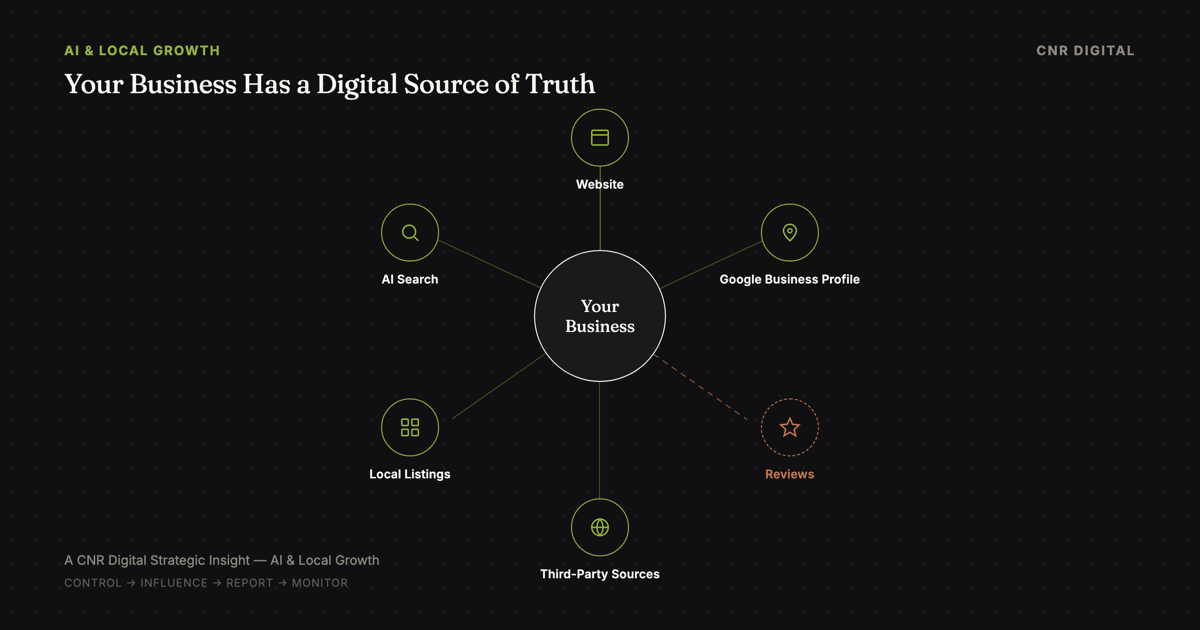
If Google's AI is showing inaccurate information about your business, start by documenting exactly what it says, where it appears and which sources appear to support the answer.
Then correct any inaccurate information you directly control (especially your website and Google Business Profile), investigate conflicting third-party sources, report the AI response to Google and monitor whether the answer changes.
But understand the limitation:
You cannot directly edit a Google AI Overview the way you can edit your own website or Google Business Profile.
Google itself warns that AI responses may contain mistakes, and its AI Overview help documentation provides a feedback process for reporting inaccurate or otherwise problematic answers.
That means business owners need to think about the problem in three categories:
Information You Control
- Your website
- Service and location pages
- About page and FAQ
- Menus and pricing you publish
- Contact information
- Structured data
- Much of your verified Google Business Profile
Information You Influence
- Customer reviews
- Third-party directories
- Publications and articles
- Independent forum discussions
- Other people's social posts
Information You Cannot Directly Control
- The final answer Google's AI generates
- Which sources it weighs most heavily
- Whether a reported correction is applied
- How quickly an answer updates
Understanding that distinction prevents you from wasting time looking for a nonexistent "Edit AI Overview" button.
It also points toward what you can do.
Is Google AI Really Showing Incorrect Information About Businesses?
Yes, there are documented examples, but the scale of the problem shouldn't be exaggerated.
Recent reporting in August 2026 documented small-business owners who said Google AI Overviews displayed inaccurate, outdated or misleading characterizations of their companies.
Reported problems included information apparently being associated with the wrong business and summaries owners believed overrepresented negative or unreliable information.
Similar complaints have appeared in business-owner communities.
These individual reports do not establish how often the problem occurs across Google Search.
Google acknowledges the fundamental limitation directly in its documentation: AI responses can include mistakes.
So if you're seeing incorrect information, don't assume you're imagining the problem.
But don't panic either.
Diagnose it systematically.
The CNR Digital AI Information Correction Framework
When inaccurate AI information appears about a business, work through this sequence:
The CNR Digital AI Information Correction Framework
Here's what each step means.
Step 1: Verify Exactly Where the Incorrect Information Appears
Don't begin changing your website immediately.
First determine what you're actually dealing with.
Take a screenshot.
Record:
- the exact search query
- date and time
- device
- whether you were signed into Google
- location if relevant
- exact inaccurate statement
- sources or citations displayed
- URL of the search where practical
Then run several related searches.
If Google incorrectly says your Hoboken restaurant doesn't accept reservations, for example, test queries such as:
Does [restaurant] accept reservations? [restaurant] reservations Can I reserve a table at [restaurant]? [restaurant] Hoboken
The purpose isn't to obsessively query Google.
It's to determine whether the response is an anomaly or a recurring misunderstanding.
Direct answer: If Google AI shows incorrect information about your business, document the exact output before attempting corrections. AI-generated responses can vary, so you need evidence of what appeared and under which query.
Step 2: Determine Where the Wrong Information May Be Coming From
Look at the sources Google presents alongside the AI response.
Then search the inaccurate statement itself.
Suppose Google says:
"The restaurant does not offer outdoor seating."
But your restaurant added a patio six months ago.
Search your digital footprint.
Maybe:
- your website never mentions the patio
- Google Business Profile has an outdated attribute
- an old Yelp review says there's no outdoor seating
- a local article from 2023 describes the old location
- an old directory remains indexed
- a former menu or location page is still accessible
Sometimes the problem isn't that the correct information doesn't exist.
It's that multiple versions of reality exist online.
That brings us to the most important distinction in this article.
What You Control vs. Influence vs. Cannot Control
Information You Control
This should be your first correction layer.
Depending on the business, you may control:
- your website
- service pages
- location pages
- About page
- FAQ
- menus
- pricing information
- contact information
- hours displayed on your website
- structured data
- certain social profiles
- much of your verified Google Business Profile
Google lets verified Business Profile owners update important business details.
Fix these first.
Information You Influence
You usually cannot directly edit:
- customer reviews
- Reddit conversations
- newspaper articles
- third-party blog posts
- independent directories
- old customer photographs
- other people's social posts
You can sometimes contact publishers about objectively outdated factual information.
You can also create more accurate current information over time.
But you don't control independent speech simply because it concerns your company.
Information You Cannot Directly Control
You do not control the final answer Google's AI generates.
That's critical.
You can strengthen Google's available information.
You can correct your sources.
You can report inaccurate outputs.
You cannot dictate:
"Google AI must describe my business this way."
That is why AI reputation management is partly an information-management problem, not an AI-control problem.
Step 3: Correct Your Website First
Your website should be the clearest factual source about the business that you control.
Google's guidance for generative AI search reinforces many traditional SEO fundamentals: make content useful, accessible and crawlable. Google has also stated that there are not separate special technical requirements businesses must implement simply to participate in AI Overviews or AI Mode.
Audit the factual information on your site.
Check:
Business name: Is the naming consistent?
Locations: Are current addresses clearly documented?
Hours: Are they accurate?
Services: Can customers understand what you actually offer?
Prices: If you publish them, are they current?
Leadership and team information: Have former employees been removed where appropriate?
Menus: For restaurants, are old menus still indexed?
Policies: Have cancellation, refund, appointment or reservation policies changed?
Contact information: Are phone numbers and emails current?
FAQs: Are common factual questions explicitly answered?
The goal is not to write unnatural copy for Google's AI.
The goal is to establish an authoritative digital source of truth.
Step 4: Audit Your Google Business Profile
For a local business, this deserves immediate attention.
Google Business Profile feeds information into Search, Maps and other Google services.
Verified owners can edit information such as address, hours, contact information and photos.
But there's another detail many business owners don't realize:
Google may also update Business Profile information using information from other sources.
That means you should periodically inspect your profile even if you didn't make a change.
Review:
- business name
- primary and secondary categories
- address
- map location
- phone
- website
- normal hours
- special hours
- services
- attributes
- photos
- menu information where applicable
- reservation or ordering links where applicable
If Google provides source or collected-information details for your profile, review those as well.
Step 5: Audit Major Third-Party Sources
Now search for your company as if you had never heard of it.
Try:
[business name] [business name] reviews [business name] location [business name] hours [business name] services [business name] complaints [business name] + whatever fact Google got wrong
Inspect the strongest relevant results.
For a New Jersey restaurant, salon or barbershop, that might include local publications, Yelp, reservation platforms, industry directories and social profiles. For a New York professional practice, the relevant information ecosystem may be different.
Don't blindly create 100 directory listings.
Find the sources that actually contain information about your company and correct factual inaccuracies where legitimate correction mechanisms exist.
Step 6: Create Consistency Across Your Digital Presence
Suppose a business has:
Website: 8 a.m.–8 p.m. Google: 8 a.m.–7 p.m. Facebook: 9 a.m.–6 p.m. Old directory: permanently closed Yelp: old phone number
Which version should a customer trust?
And which version should an automated retrieval system trust?
We cannot responsibly claim that perfect information consistency guarantees an accurate AI Overview.
It doesn't.
But contradictory information objectively makes the business harder to understand.
The strategic objective is simple:
Create one accurate factual story about the business and make the important sources reflect it.
Step 7: Report the Incorrect AI Overview to Google
Once you've corrected underlying information, report the AI response itself.
Google provides a feedback mechanism for AI Overviews. At the bottom of the AI Overview, use the available negative-feedback option and choose the appropriate reporting workflow.
Provide specifics.
Instead of:
"This is wrong."
write something closer to:
"The AI Overview states that ABC Restaurant does not accept reservations. This is inaccurate. The restaurant currently accepts reservations, as documented on its official website and current Google Business Profile."
Include the strongest authoritative source when the interface allows useful context.
Does reporting guarantee Google will change it?
No.
Google provides a reporting mechanism, but submitting feedback does not guarantee an immediate correction.
That's why reporting is one step, not the entire strategy.
Step 8: Request Recrawling After Important Website Corrections
If you've corrected inaccurate information on your own site, Google needs to encounter the updated version.
For important URLs, use Google Search Console's URL Inspection tools after correcting the information.
Make sure:
- the corrected page is indexable
- Googlebot isn't blocked
- the page returns a successful response
- canonicalization is correct
- structured data matches visible information
- old conflicting pages aren't unintentionally competing
Again:
A recrawl doesn't guarantee the AI Overview changes.
It simply helps make your updated first-party information available to Google Search.
Step 9: Strengthen the Authoritative Information Around Your Business
This is where the strategy shifts from correction to prevention.
A business should not wait for an AI mistake before thinking about its digital information.
Consider two hypothetical businesses.
Business A has an outdated five-page website, inconsistent hours, abandoned social profiles, an incomplete Business Profile, old directories, few current photographs and unclear service information.
Business B has a maintained website, explicit service and location information, an accurate Business Profile, current photography, genuine recent reviews, accurate important third-party listings, useful content answering customer questions and consistent brand information.
Does Business B have a guarantee that Google's AI will never make a mistake?
Absolutely not.
But Business B has created a substantially clearer digital representation of reality.
And that has value beyond AI.
Customers benefit. Google Search benefits. Maps users benefit. AI retrieval systems may benefit. Your sales process benefits.
This is why modern digital-presence management is becoming broader than simply having a website.
Can I Control What Google AI Says About My Business?
No, not directly.
You can control much of the information on your website.
You can manage many fields in your verified Google Business Profile.
You can correct some third-party listings.
You can request corrections from publishers.
You can report problematic AI Overviews.
You can improve the overall accuracy and authority of your digital presence.
But Google's systems determine the final AI-generated response.
Any agency promising:
"We'll control what Google AI says about you."
is promising something it does not control.
A better objective is:
Make accurate information about your business easier to find, verify and trust.
Does Google Business Profile Control What AI Overviews Say?
Not by itself.
Your Business Profile is an important Google-managed source of local-business information.
But an AI Overview should not be treated as a direct rendering of your Business Profile.
Google's AI Search experiences can use the broader Search infrastructure and information available across Google's index.
That means fixing your Business Profile is important when its information is incorrect.
But if the inaccurate claim originated elsewhere, editing the profile alone may not resolve the underlying conflict.
Think ecosystem, not single listing.
What If the Wrong Information Comes From an Old Article or Review?
First distinguish inaccurate facts from opinions you dislike.
A customer writing:
"I hated the food."
is expressing an opinion.
A directory saying:
"The restaurant is permanently closed"
when it is currently open is a factual problem.
For incorrect factual information on a third-party website, contact the publisher or platform through its legitimate correction process.
If information potentially violates applicable law or legal rights, Google maintains separate legal-removal processes for certain circumstances.
Legal escalation is different from ordinary SEO or reputation management.
For serious potentially defamatory or legally consequential claims, seek appropriate professional legal guidance rather than assuming an SEO tactic is the solution.
What Should a Local Business Do Before This Happens?
The best time to discover that Google thinks your business closes at 5 p.m. isn't when a customer tells you they didn't come because Google said you were closed.
Build a simple digital-information audit into normal business operations.
For a restaurant, salon, barbershop, fitness studio, boutique, retailer, professional practice or service business in New Jersey, New York or elsewhere, periodically review:
- Website information
- Google Business Profile
- Search results for your brand
- Maps information
- Major industry platforms
- Review platforms
- Important directories
- AI answers for common branded questions
- Search Console data
- Conversion behavior
Major business changes should trigger an immediate audit. Examples include: moving locations, changing hours, changing phone numbers, adding or removing services, rebranding, changing ownership, launching a new website, changing reservation or ordering systems, opening another location, closing a location.
AI has added another reason to keep this information current.
What Business Owners Should Not Do
Don't rewrite your entire website because of one AI answer. First reproduce and diagnose the problem.
Don't create dozens of pages repeating the same "correct" statement. That's not authority. That's duplication.
Don't buy fake positive reviews to "correct" AI. It creates reputation and platform risk.
Don't attack legitimate negative commentary. If criticism is accurate, solve the underlying business problem.
Don't assume Google Business Profile is the only source. AI-powered Search may retrieve information from the broader web.
Don't believe anyone who guarantees an AI correction. No outside consultant controls Google's generated response.
Don't ignore the problem either. If customers searching your brand encounter materially inaccurate information, treat it as a legitimate digital customer-experience issue.
The Bigger Shift: Your Business Now Has a Machine-Readable Reputation
For years, local businesses thought about their online presence in relatively separate pieces: website, Google listing, reviews, social media, directories, press.
AI-powered discovery increasingly attempts to synthesize information across sources.
That changes the strategic challenge.
A customer may no longer inspect ten different sources independently.
An AI system may attempt to summarize what those sources collectively say.
If the underlying information is contradictory, stale or incomplete, the resulting summary can be wrong.
The solution isn't to manipulate AI.
It is to build a better digital source of truth.
Your business should be:
Clear: What exactly do you do?
Current: Is the information still true?
Consistent: Do important sources agree?
Credible: Is there independent evidence supporting what you claim?
Crawlable: Can search systems access the information?
Actionable: Can a customer take the next step?
That's useful whether a customer discovers you through Google Maps, traditional Search, an AI Overview, ChatGPT, Gemini, or whatever comes next. Restaurants specifically can see this play out already: what restaurant owners should know about ChatGPT and restaurant reservations walks through the same clear/current/consistent/credible/crawlable/actionable idea applied to AI-assisted restaurant discovery and booking.
What Should I Do Right Now If Google AI Is Wrong About My Business?
Use this checklist:
- Screenshot the inaccurate response.
- Record the exact query that produced it.
- Inspect the sources displayed with the response.
- Search for the inaccurate claim across the web.
- Correct your website if necessary.
- Correct your Google Business Profile if necessary.
- Correct legitimate third-party factual inaccuracies where possible.
- Submit feedback on the AI Overview to Google.
- Request recrawling of materially changed first-party pages.
- Recheck the query periodically rather than repeatedly changing information every day.
If the issue persists, broaden the investigation.
If the inaccurate claim creates a potentially serious legal or reputational issue, determine whether appropriate platform escalation or professional legal guidance is warranted.
You Can't Control the AI. You Can Strengthen the Information It Encounters.
The emergence of inaccurate AI business summaries exposes something bigger than an AI problem.
Many businesses do not have a single well-maintained digital source of truth.
Their website says one thing. Google says another. An old directory says something else. A three-year-old article remains indexed. Social profiles haven't been updated.
And increasingly, AI systems are being asked to make sense of all of it.
The response should not be fear.
And it shouldn't be another "AI SEO hack."
It should be better digital infrastructure.
Maintain your website. Maintain your local presence, including your local SEO foundation. Keep important information accurate. Build genuine reputation. Correct outdated information. Monitor what customers encounter.
Because modern visibility is becoming less about maintaining a website in isolation and more about maintaining a digital representation of the business itself.
Sources
- Google: AI Overview help and feedback
- Google: Business Profile guidance: editing your info
- Google: Business Profile guidance: updates from other sources
- Google Search Central: AI features
- Google Search Central: AI optimization guide
- Google: Legal Help Center
- Business Insider: Google's AI Overviews investigation (August 2026)
Your Digital Presence Should Stay Current
Strengthen the Digital Source of Truth Behind Your Business
Your website is only one part of what customers (and increasingly search and AI systems) encounter when they research your company.
CNR Digital's Brand Growth System brings your website, visibility, reviews, customer response and ongoing digital management together so your online presence doesn't simply launch and sit untouched.
See How the Brand Growth System WorksPrefer to talk through your digital presence first? Start a conversation with CNR Digital.
Continue Reading
Related Insights
Local Business Growth
Local SEO for New Jersey Small Businesses: How to Get Found and Turn Searchers Into Customers
Local SEO is about more than ranking on Google Maps. Learn how your website, Google Business Profile, reviews and customer experience can work together to turn local searches into customers.
Restaurant Growth
Google Maps Can Now Help Order Food With AI. Here's What Restaurant Owners Should Do.
Google's Ask Maps can now help customers find a restaurant and order food through AI conversation. Here's what actually changed, what's confirmed and what restaurant owners should do next.